Ultimate Guide to Local Website Speed Optimisation

Your local business success hinges directly on website speed. Although slow websites can still achieve high rankings, poor performance creates frustrating user experiences that drive potential customers away and eventually harm your Google positioning.
Here’s how to fix this:
- Key Metrics to Monitor:
- Largest Contentful Paint (LCP): Load main content in under 2.5 seconds.
- First Input Delay (FID): Ensure site responds in less than 100ms.
- Cumulative Layout Shift (CLS): Keep layout shifts under 0.1.
- Quick Fixes:
- Mobile Speed Tips: Implement AMP for faster loading on mobile devices (not always worth the trouble).
- Regular Maintenance: Use tools like Google PageSpeed Insights and GTmetrix to monitor performance.
Fast websites mean better search rankings, lower bounce rates, and more conversions. Start optimising today to stay ahead in Australia’s competitive market.
Master Core Web Vitals in One Hour: The Ultimate Website …
Technical Speed Improvements
Learn how to optimise your site technically for faster load times, especially for local SEO performance and Australian audiences.
Web Hosting Selection
Selecting the right web hosting provider is essential for Australian businesses.
Hosting your website on servers located in Australia, and ideally in your target city can significantly reduce the physical distance between your server and your users, leading to quicker load times.
| Key Factor | Impact on Speed | Recommendation |
|---|---|---|
| Server Location | Reduces distance | Choose quality Australian hosts (e.g., Sydney, Melbourne, Perth) |
To complement your hosting setup, consider integrating a CDN for even better performance.
There are a lot of BAD Australian web hosts available on the market, which is why you should pick your web host carefully!
CDN Setup and Benefits
A Content Delivery Network (CDN) stores copies of your content across multiple servers, ensuring it’s delivered from a location closer to your users. For Australian businesses, using a CDN with servers located in Australia or nearby regions can help minimise latency and further improve load times.
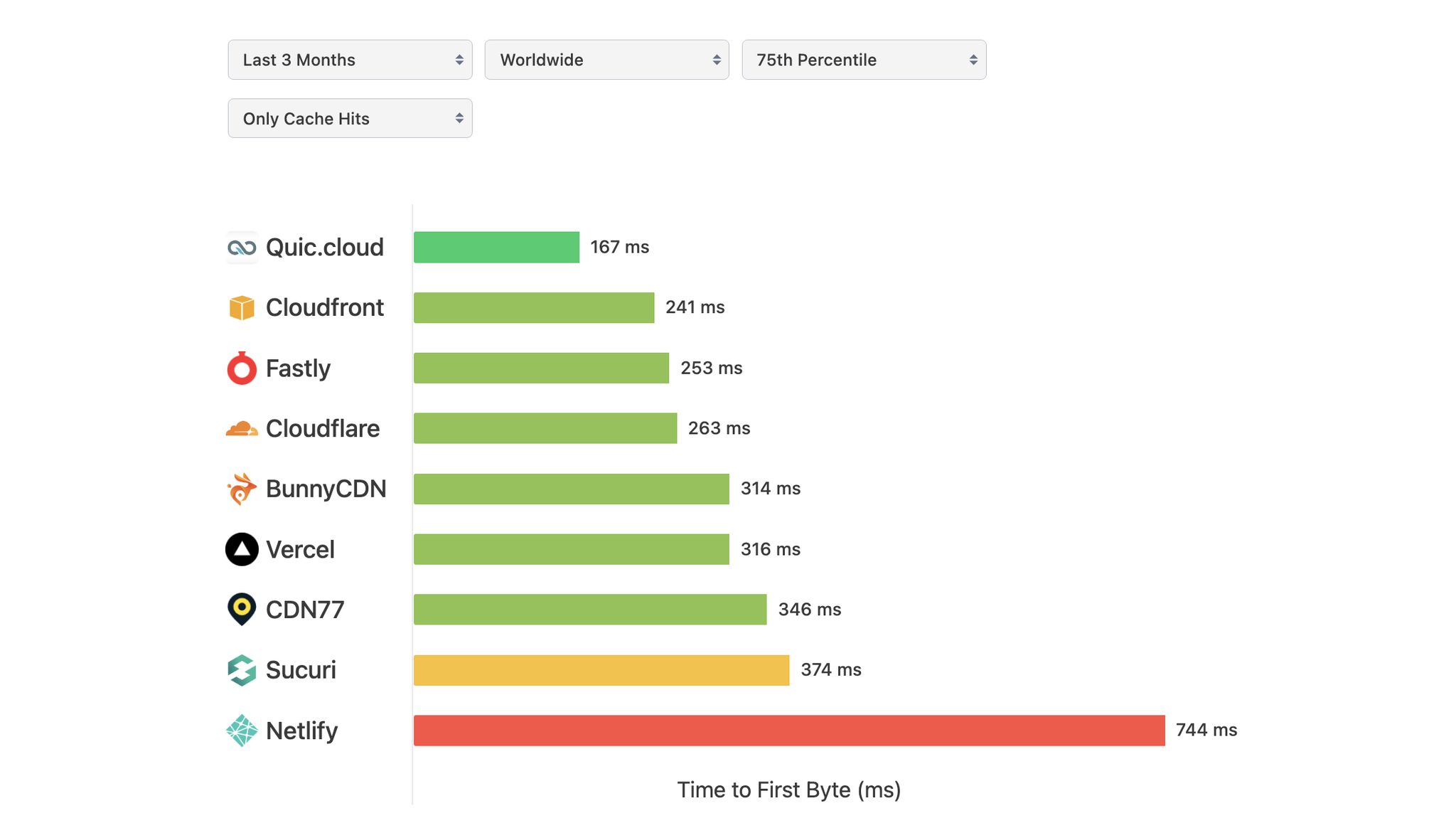 Source: https://speedvitals.com/cdn-performance-tracker
The best-performing CDN network is consistently Quick.cloud which is the CDN network offered by Litespeed. It is available for free and integrated with most good Litespeed web hosts. Which leads us to our next point.
Web Host Server
At Search Scope, we only use Litespeed web servers and Litespeed web hosts, as they are the best-performing server tech available.
We love LiteSpeed because it delivers lightning-fast website speeds that keep visitors engaged and boost your local search rankings. The built-in LSCache feature is a game-changer, automatically optimizing your site’s performance without complex setups.
This powerful combination means your local business website loads instantly, creates a seamless experience for potential customers, and gives you a competitive edge in your community—all without requiring technical expertise on your part.
LS Cache outperforms most caching plugins available on the market!
Content and Structure Speed Tips
Image Speed Optimisation
Optimising images is key to improving load times, especially for Australian websites. Using modern formats and responsive images helps reduce file sizes while ensuring they display well on all devices.
| Image Format | Best Use Case |
|---|---|
| WebP | Great for photos and graphics to reduce file sizes |
| SVG | Ideal for logos and icons where scalability is important |
| Optimised PNG | Best for screenshots and images needing transparency |
Want to make your site even faster? Deferring non-critical resources is another effective way to boost speed.
Lazy Loading Setup
Lazy loading speeds up the initial page load by delaying the loading of resources that aren’t immediately visible.
Here are some best practices for setting it up:
- Native Lazy Loading
Use theloading="lazy"attribute on images and iframes to defer their loading:
<img src="image.jpg" loading="lazy" alt="Description"> - JavaScript-Based Lazy Loading
For broader browser compatibility, use JavaScript solutions to load images as users scroll. - Prioritising Critical Content
Focus on loading key elements first by following these guidelines:
| Content Type | Loading Priority | Implementation Method |
|---|---|---|
| Hero Images | Immediate | Standard loading |
| Below-Fold Images | Deferred | Lazy loading |
| Video Embeds | Deferred | Click-to-load or lazy load |
| Comments Section | Deferred | Load on scroll |
sbb-itb-c74901f
Mobile Speed Optimisation
AMP Implementation Guide
Accelerated Mobile Pages (AMP) can help improve loading times on mobile devices. While we do not recommend this technology for most local business websites, it has its place in specific scenarios.
AMP implementation can be technically challenging, often requiring specialised development skills, and may break essential features like contact forms or appointment booking systems that are crucial for local businesses. Instead of pursuing AMP, we suggest focusing on proper site optimization.
However, AMP does offer significant benefits for news publishers seeking visibility in Google Discover or those running Google News-approved websites, where the stripped-down, lightning-fast format aligns perfectly with content consumption patterns.
Here’s how to implement them:
- Basic AMP Setup
Use an AMP HTML template as your starting point. Make sure all CSS is inlined and stays within AMP’s size limits. Once done, check your page using the official AMP validator to ensure it’s compliant. - Component Integration
Replace standard HTML elements with AMP-specific components. For example, use<amp-img>for images to improve responsiveness and loading speed. - Testing and Validation
Run your AMP pages through the official AMP validator. Fix any issues before going live. Incorporating AMP alongside other mobile optimisation strategies can make your site load faster for users on the go.
Speed Testing and Maintenance
After implementing optimisation measures, it’s important to keep track of performance with regular speed testing.
Speed Test Tools Guide
Several tools can help you monitor your site’s performance:
- Google PageSpeed Insights: Analyses both mobile and desktop performance, providing metrics like First Contentful Paint (FCP), Time to Interactive (TTI), and Cumulative Layout Shift (CLS).
- WebPageTest : Our favorite tool. Provides advanced data and waterfall reports allowing you to get to the bottom of your speed issues.
- GTmetrix: Uses real browser data and waterfall charts to identify performance bottlenecks.
- Lighthouse (available in Chrome DevTools): Offers detailed reports covering performance, accessibility, best practices, and SEO.
These tools generate reports that can guide your maintenance efforts and help address any issues.
Understanding Speed Reports
When reviewing speed reports, focus on these important metrics:
- Core Web Vitals: Refer to the Core Web Vitals benchmarks mentioned earlier for specific targets.
- Server Performance Metrics:
- Time to First Byte (TTFB): Should be under 200 milliseconds.
- DNS Lookup Time: Aim for less than 50 milliseconds.
- Server Response Time: Keep it below 200 milliseconds.
These metrics provide valuable insights for planning your regular maintenance.
Regular Speed Checks
A consistent monitoring schedule helps maintain your site’s performance. Here’s an example:
| Frequency | Tasks | Key Focus Areas |
|---|---|---|
| Weekly | Quick PageSpeed scans | Core Web Vitals, mobile performance |
| Monthly | Detailed GTmetrix analysis | Server response, resource loading |
| Quarterly | Full technical audit | Infrastructure updates, code optimisation |
During these checks, pay close attention to mobile performance, regional response times, resource updates, and the effectiveness of caching. Keep a log of metrics to track trends and quickly spot any new issues.
Conclusion
Quick Action Steps
Australian businesses should focus on improving site speed. Here’s a handy guide to help you get started:
| Priority | Action | Expected Impact |
|---|---|---|
| High | Resize and optimise images | Faster loading times |
| High | Use browser caching | Better experience for returning visitors |
| Medium | Reduce HTTP requests | Smoother initial load times |
| Medium | Set up a CDN | Faster access for regional users |
| Low | Monitor speed regularly | Maintains consistent performance over time |
These steps can lead to noticeable improvements in your website’s performance.
Why Speed Matters for Local Businesses
For Australian businesses, a fast website isn’t just a technical perk – it’s a competitive edge. Here’s how it helps:
- Enhanced user experience keeps visitors engaged and affects rankings positively
- Lower bounce rates lead to happier customers and higher conversions
A faster site not only performs better but also contributes to the growth and success of your business.
Related posts

Dorian Menard
https://staging.searchscope.com.auI’m Dorian, founder of Search Scope and an SEO obsessed with ROI and lead generation. After a decade in the trenches, I’ve built and ranked digital assets for businesses across the world. I cut through the noise with data, automation, and strategies that actually convert. When I’m not scaling rankings, you’ll find me on a motorbike or setting chess traps — always planning three moves ahead.