Ahrefs Site Audit: Comprehensive Guide

Ahrefs Site Audit is a powerful tool for improving your website’s technical SEO. It scans your site to detect over 170 issues, like broken links, duplicate content, and slow loading pages, and provides clear steps to fix them. Here’s what you need to know:
- Health Score: Measures your site’s technical health (aim for 90+).
- Issue Prioritisation: Errors (critical), warnings (moderate), and notices (minor).
- Crawl Settings: Customise speed, JavaScript rendering, and more.
- Core Features: Integration with Google Search Console, PageSpeed Insights, and interactive data visualisation.
Quick Setup Steps:
- Create a project (import from Google Search Console or manual setup).
- Adjust crawl settings for accuracy.
- Schedule regular scans to monitor progress.
Why It Matters: Regular website and SEO audits help improve your site’s visibility, user experience, and search rankings. Use Ahrefs’ advanced tools like schema checks, internal link analysis, and Core Web Vitals optimisation to stay ahead. Prioritise fixes based on severity and track improvements over time.
This guide will help you use Ahrefs Site Audit effectively to boost your site’s performance and rankings.
SEO Audit: How to Fix Your Website’s Technical SEO Issues
First-Time Setup Guide
Getting started with a proper setup is key to running accurate audits. Here’s how to set everything up step by step.
Starting a Project
You can create a project by importing data directly from Google Search Console (GSC) for faster setup, or you can opt for manual configuration.
For manual setup, here’s what you need to do:
- Click the "+ New Project" button on your Ahrefs dashboard.
- Define the scope of your project: a domain, subdomain, or specific path.
- Verify ownership of the website.
- Set up the initial audit parameters.
Once the project is created, make sure to adjust the crawl settings to suit your site.
Crawl Settings
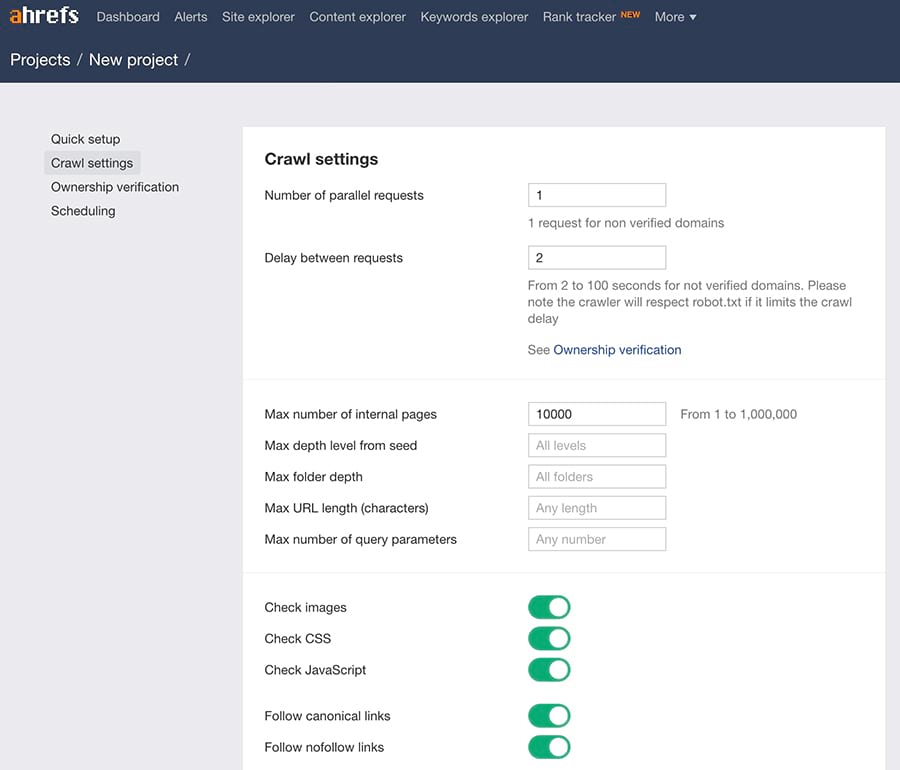
Crawl settings play a big role in the accuracy of your audits. While the default settings work for most websites, you can tweak them for specific needs.
| Setting Type | Recommended Configuration | Best For |
|---|---|---|
| JavaScript Rendering | Enabled | Single-page apps, dynamic content |
| Crawl Speed | Slow to Medium | Shared hosting or budget servers |
| URL Parameters | Custom regex filters | Large sites with specific sections |
| Authentication | Login details | Password-protected areas |
"A project is any domain, subfolder, or URL that you want to track automatically over time." – Ahrefs
After configuring crawl settings, set up automated scans to ensure consistent monitoring.
Setting Up Regular Scans
To enable recurring crawls, navigate to the Schedule section in the Site Audit settings.
Here’s what to keep in mind:
- Scan Frequency: For websites with frequent updates, schedule weekly scans. For static sites, monthly scans should suffice.
- Time Selection: Choose off-peak hours to reduce server strain during scans.
- Monitoring Setup: Enable the "Run scheduled Crawls" option to keep track of changes over time.
Keep in mind that any changes to these settings will only apply to future crawls, so take your long-term monitoring needs into account during the initial setup.
Reading Audit Results
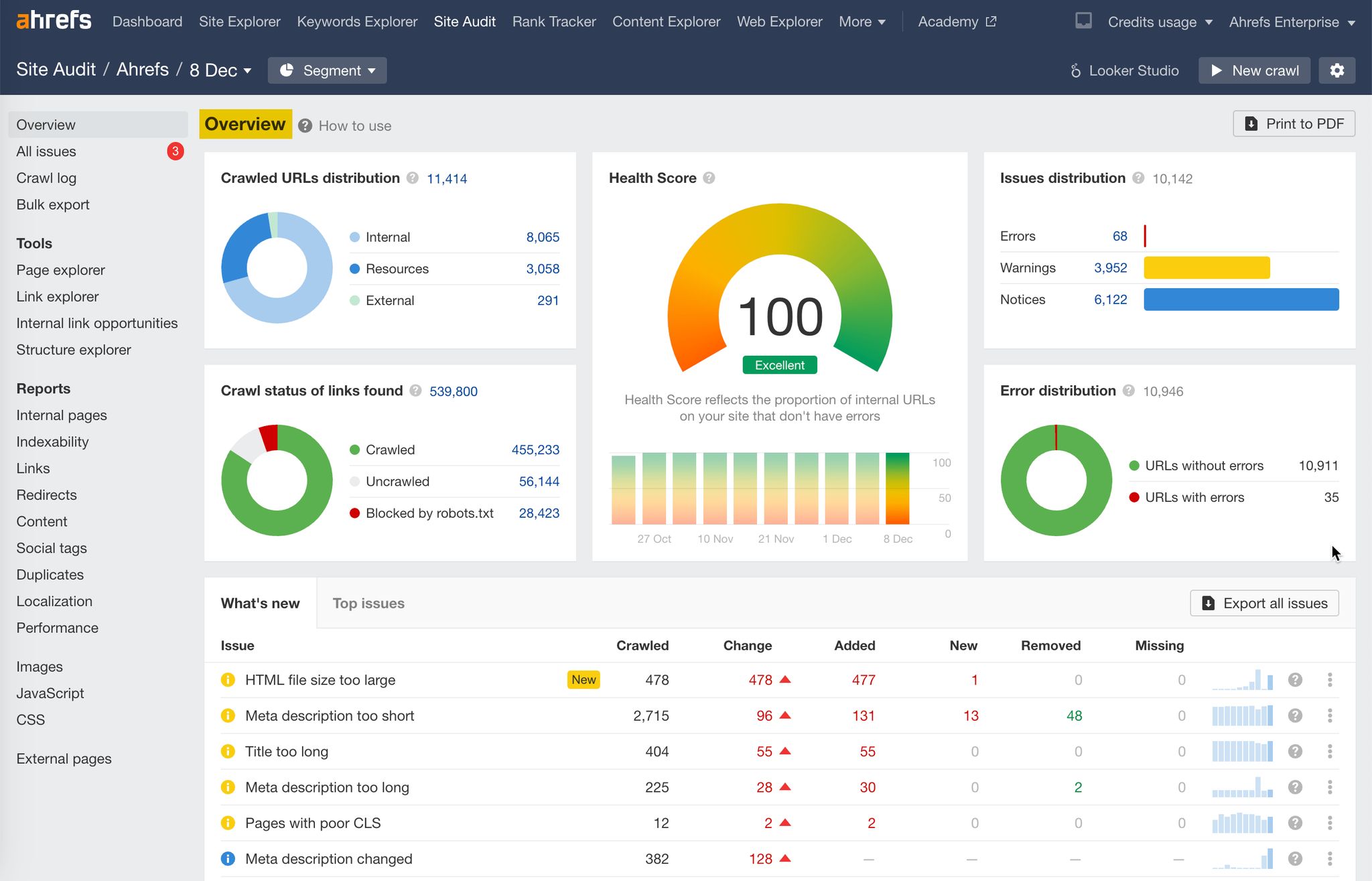
To improve your site’s technical health, focus on three main areas: Health Score, Issue Types, and Crawl Data.
Health Score Explained
The Health Score measures your website’s technical SEO performance. It shows the percentage of internal URLs without errors.
| Health Score Range | Rating | What It Means |
|---|---|---|
| 91–100 | Excellent | Your site has very few technical issues. |
| 71–90 | Good | Some fixes are needed, but overall it’s solid. |
| 31–70 | Fair | Major technical problems need addressing. |
| 0–30 | Weak | Critical issues require immediate action. |
"Health Score reflects the proportion of internal URLs on your site that don’t have errors." – Ahrefs
Strive for a Health Score above 90 to keep your site running smoothly. Once you’ve checked this, move on to evaluating issue types.
Issue Types and Priority
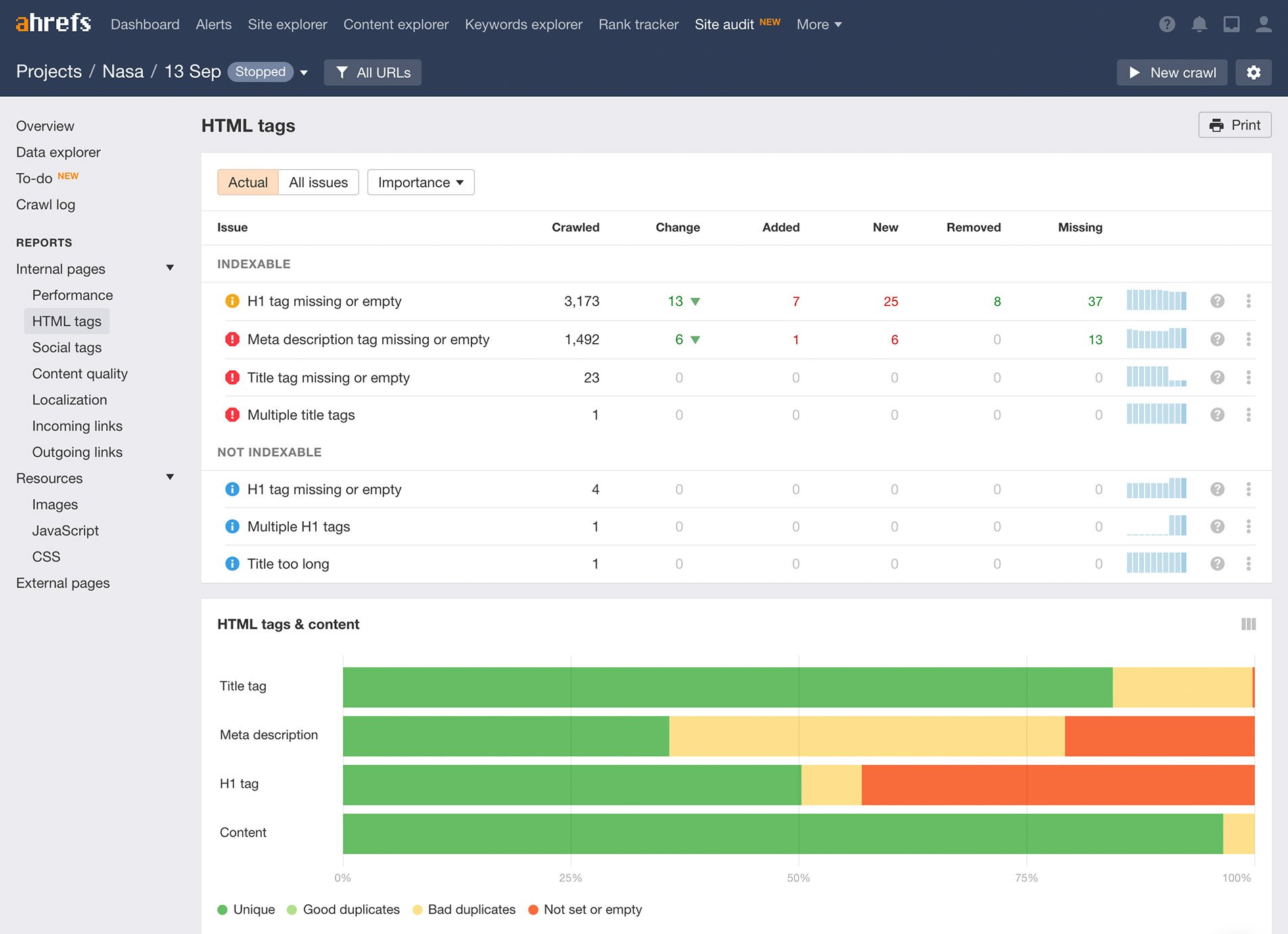
Ahrefs organises technical SEO issues into three priority levels:
- Errors (Red): These are critical and directly affect your Health Score. Examples include broken links, missing title tags, or duplicate content. Fix these first.
- Warnings (Yellow): These don’t impact your Health Score but can still hurt SEO performance. Address these after resolving errors.
- Notices (Blue): These are informational and may not require immediate action but are worth reviewing.
"The Technical SEO Audit is like an assessment of the foundation of a house. You can still live in a house without a great foundation, but eventually cracks will appear. If you don’t take care of your Technical SEO issues early, you might end up reducing the impact of other SEO efforts and limiting your potential growth." – Rodrigo Lasanta, Lead SEO Specialist
With your priorities clear, dive into your crawl data for deeper insights.
Crawl Data Overview
Crawl data reveals how search engines interact with your site. Focus on these key metrics:
| Metric | Target/Goal | Why It Matters |
|---|---|---|
| Page Response Status | >80% OK | Ensures most pages are accessible. |
| Discovery Rate | >5% | Shows search engines are finding new pages. |
| Server Response Time | Fast | Faster responses improve crawl efficiency. |
To make the most of this data:
- Look for patterns in total crawl requests to spot issues.
- Analyse server performance to ensure smooth operations.
- Fix 404 errors and server issues promptly.
- Confirm that your robots.txt file is accessible.
For detailed fixes, use the "Why and how to fix" feature in Ahrefs.
sbb-itb-c74901f
Fixing SEO Problems
Use the insights from your audit to address issues with indexing, linking, and performance. Here’s how to tackle these challenges step by step.
Page Indexing Fixes
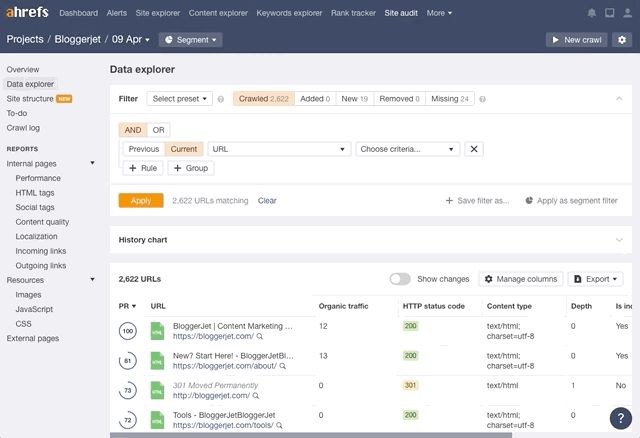
Check the indexability report in Ahrefs Webmaster Tools (AWT) and focus on these key areas:
- Canonical Tags: Replace incorrect canonical tags to prevent duplicate content issues.
- Noindex Tags: Remove ‘noindex’ tags from pages you want search engines to index. Double-check your
robots.txtfile for accidental blocking. - Orphan Pages: Link pages that are isolated from the rest of your site. Strategic internal linking can help – see the next section for tips.
Once you’ve addressed these indexing issues, it’s time to refine your internal linking structure to strengthen your site’s authority.
Internal Link Structure
"Internal linking is super critical for SEO. It’s one of the biggest things you can do on a website to guide Google and visitors to the pages that you think are important." – Dorian, Perth SEO Expert.
To build an effective internal link structure, focus on these strategies:
| Action Item | How to Do It | Why It Matters |
|---|---|---|
| Deep Linking | Link directly to specific content pages, not just the homepage | Boosts crawl depth and page authority |
| Anchor Text | Use clear, descriptive text for your links | Helps search engines understand context |
| Link Distribution | Ensure key pages are no more than 3–5 clicks from the homepage | Improves crawl efficiency |
By improving your internal links, you make it easier for both users and search engines to navigate your site.
Speed and Web Vitals
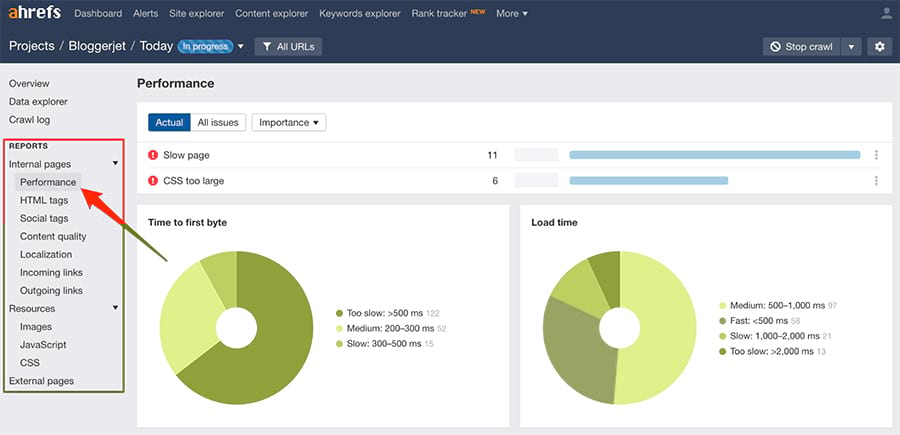
Core Web Vitals are essential for both user experience and search rankings. Here’s a quick breakdown:
| Metric | Target Score | Key Areas to Focus On |
|---|---|---|
| LCP (Largest Contentful Paint) | ≤2.5 seconds | Prioritise loading critical resources, reduce file sizes |
| INP (Interaction to Next Paint) | ≤200ms | Optimise JavaScript execution, split long tasks |
| CLS (Cumulative Layout Shift) | ≤0.1 | Reserve space for media, improve font loading |
To improve these metrics:
- Faster Loading (LCP): Host resources locally, enable caching, and compress files.
- Better Interactivity (INP): Minimise JavaScript, use server-side rendering, and break up long-running tasks.
- Visual Stability (CLS): Reserve space for dynamic elements, optimise fonts, and use layout-preserving animations.
Advanced Tools and Features
Beyond basic fixes, advanced tools and integrations allow for more precise optimisation and custom solutions. Here’s a closer look at how these features can improve your website’s performance.
Content Analysis
These tools help you dive deeper into your content strategy:
| Analysis Feature | Purpose | Action Items |
|---|---|---|
| Duplicate Content Detection | Spot identical or overly similar content | Fix duplicate pages, titles, and meta descriptions |
| Content Gap Analysis | Identify missing subtopics | Research competitors and add relevant sections |
| Traffic Potential | Assess a page’s reach | Focus on optimising pages with the most growth potential |
"Site Audit crawls all your website’s pages. It flags all possible technical and on-page SEO issues, provides recommendations on how to fix them, visualises key data in a chart, and delivers an overall SEO health score." – Ahrefs
Schema Markup Check
Structured data can improve how search engines interpret your site. Here’s how to ensure accuracy:
- Validation Process: Use the "All issues" report to identify schema errors and prioritise fixes based on traffic impact.
- Implementation Check: Validate schema using the Ahrefs SEO Toolbar and submit critical URLs through Google Search Console.
Tool Integration Tips
Integrating tools can simplify reporting and improve collaboration. Here are some useful pairings:
| Integration Type | Recommended Tools | Key Benefits |
|---|---|---|
| Analytics | Google Analytics, Adobe Analytics | Link search traffic data with user behavior |
| Rank Tracking | SERPWatcher, Rank Tracker | Keep tabs on keyword ranking changes |
| Technical SEO | Screaming Frog, Sitechecker | Boost crawling and error detection capabilities |
| Data Visualisation | Google Data Studio, Tableau | Build custom SEO dashboards |
For even greater efficiency, use the Ahrefs API to automate data workflows. Connect Ahrefs with tools like Asana or Trello to track SEO tasks and improve team coordination.
Website Maintenance Guide
After fixing technical errors, keeping your site healthy requires consistent effort and organisation.
Issue Management
Ahrefs helps you manage technical SEO issues using three priority levels:
| Priority Level | Description |
|---|---|
| Errors (Red) | Critical problems that impact SEO |
| Warnings (Yellow) | Issues that need attention but aren’t urgent |
| Notices (Blue) | Minor updates or informational suggestions |
Enable the Always-on audit to catch issues in real time and get instant alerts. With Data Explorer, you can:
- Generate detailed issue reports
- Create task lists for developers
- Track the progress of fixes
- Log the dates when issues are resolved
Progress Monitoring
Your website’s Health Score reflects the percentage of internal URLs without errors – think of it as your site’s overall "health check."
- Automated Audits: Schedule weekly crawls to spot trends and prevent problems early.
- Segment Analysis: Break your site into sections and monitor specific metrics:
Website Section Focus Area Key Metrics Product Pages Schema markup, pricing HTTP status, load time Blog Content Internal links, metadata Traffic potential, depth Landing Pages Core Web Vitals Performance scores - Historical Tracking: Use crawl history to see how your website evolves over time. Track new pages, resolved issues, page updates, and shifts in your health score.
These steps help ensure your fixes stick and your site stays optimised.
Team Coordination
Ahrefs Site Audit makes teamwork easier with role-based access:
| Role | Permissions | Responsibilities |
|---|---|---|
| Workspace Admin | Full access | Strategy and oversight |
| Members | Project-specific access | Implement fixes |
| Guests | View-only access | Reporting and monitoring |
Assign roles, prioritise tasks, set deadlines, and hold weekly reviews. Export categorised issues to simplify handoffs. This structured approach keeps everyone aligned and on track.
Conclusion
Main Points Review
Ahrefs Site Audit is one of the tool we use daily as part of our local SEO services helps maintain your website’s health by scanning over 170 technical and on-page SEO issues. It organises these issues into three priority levels:
| Priority Level | Impact | Action Required |
|---|---|---|
| Critical Errors | Severe SEO impact | Immediate attention |
| Technical Warnings | Moderate impact | Planned resolutions |
| Optimisation Notices | Minor adjustments | Regular maintenance |
The tool provides actionable insights through automated crawls, helping teams address issues methodically. This structured approach ensures you’re always ready to take the next step.
Getting Started
To make the most of Ahrefs Site Audit:
- Initial Setup: Begin with a full site crawl to determine your Health Score and identify urgent issues in your Perth SEO rankings.
- Strategic Implementation: Focus on high-priority fixes based on your site’s analysis and competitive environment.
- Continuous Monitoring: Conduct regular audits to maintain consistent performance:
Audit Type Frequency Focus Areas Automated Scans Monthly Technical issues, broken links Manual Audits Quarterly Content quality, overall performance
Ongoing monitoring and quick fixes are key to keeping your site in great shape and improving rankings. By following these steps, Ahrefs Site Audit becomes a reliable tool for driving better SEO performance.
Related posts

Dorian Menard
https://staging.searchscope.com.auI’m Dorian, founder of Search Scope and an SEO obsessed with ROI and lead generation. After a decade in the trenches, I’ve built and ranked digital assets for businesses across the world. I cut through the noise with data, automation, and strategies that actually convert. When I’m not scaling rankings, you’ll find me on a motorbike or setting chess traps — always planning three moves ahead.