Google Search Console SEO Audit: The Ultimate Step-by-Step Guide

Google Search Console (GSC) helps you improve your website’s search performance and fix technical SEO issues. This guide covers everything you need to know to audit your site effectively and boost visibility.
Key Takeaways:
- Setup: Create a GSC account, verify your site, and manage multiple properties easily.
- Performance Reports: Track clicks, impressions, CTR, and rankings to optimise content.
- Index Coverage: Fix indexing errors like "noindex tags" or server issues to ensure all key pages are indexed.
- Content and Technical Fixes: Update title tags, meta descriptions, internal links, and Core Web Vitals for better rankings.
Quick Comparison of GSC Features:
| Feature | Purpose | Example Use Case |
|---|---|---|
| Performance | Track search traffic and CTR | Identify pages with high impressions but low clicks. |
| Index Coverage | Check which pages are indexed | Fix "Excluded" pages to improve visibility. |
| Core Web Vitals | Improve page speed and usability | Compress images to meet LCP standards. |
Start by setting up GSC, reviewing performance metrics, and addressing technical issues. Regular audits can help you achieve measurable SEO improvements.
18-Point Google Search Console SEO Audit Checklist
Setup Guide: Google Search Console
Getting started with Google Search Console (GSC) is an essential step for monitoring your website’s SEO performance. Here’s how to set it up.
Create Your Account
Head to search.google.com/search-console and sign in with your Google account. If you’re managing a business site, it’s a good idea to use your work Google account to keep access organised.
You’ll need to pick between two property types, depending on your needs:
| Property Type | Best For | Features |
|---|---|---|
| Domain | Larger websites | Covers all subdomains and protocols |
| URL-prefix | Single sites | Focuses on one specific URL version |
Verify Your Website
Verification is required to confirm you own the website and unlock all GSC features. Choose the method that fits your technical setup:
- For Domain Properties: Log into your DNS provider and add the TXT record provided by Google.
- For URL-prefix Properties: You can pick from these options:
- Upload the verification file to your website’s root directory.
- Insert the HTML tag into your site’s
<head>section. - Link your existing Google Analytics account.
- Use your Google Tag Manager container.
"You’ll need to prove that you are the owner of your website, because Search Console shows information about your site that only site owners should see, and allows you to make changes that can affect how your site appears on Google".
Once verified, you’re ready to start managing your site within GSC.

Manage Multiple Websites
GSC allows you to handle up to 1,000 properties in a single account. For managing multiple sites:
- Set up separate properties for each domain.
- Use the property selector dropdown to switch between them easily.
- Track subdomains if needed.
- Apply page filters in Performance reports for deeper insights.
Pro Tip: Add more than one verification method as a backup. If one method fails, you’ll still have access through another.
If you’re using platforms like WordPress or Shopify, check their built-in tools. Many platforms offer one-click verification via plugins or settings.
Website Performance Reports
The Performance Report in Google Search Console provides crucial data on how your website performs in search results. Let’s break down the key metrics that shape these insights.
Key Search Metrics Explained
Four main metrics help you understand your search performance:
| Metric | Description | What It Tells You |
|---|---|---|
| Clicks | Number of times users clicked on your site’s link | Direct traffic from search |
| Impressions | How often your site appears in search results | Visibility in search |
| CTR (Click-Through Rate) | Percentage of impressions that resulted in clicks | How appealing your content is in search |
| Average Position | Your site’s typical ranking in search results | Effectiveness of your ranking |
These metrics guide your content and SEO improvements.
"CTR measures whether users think that your page answers their question best, based on the search result." – Search Console Help
Best-Performing Content
To find your top-performing pages, head to the Performance report and sort by clicks. Google Search Console lets you analyse up to 1,000 top queries, giving you a detailed view of what works.
If you notice pages with high impressions but a low CTR, it’s time to revisit your title tags, meta descriptions, and even the content itself to better align with user intent.
Also, don’t forget to explore device-specific data. It can uncover additional opportunities for optimisation.
Desktop vs Mobile Results
Device-specific performance is a critical factor, especially since mobile users dominate web traffic. Here’s a quick comparison of how mobile and desktop results differ:
| Aspect | Mobile | Desktop |
|---|---|---|
| CTR | 28.36% for position #1 | Roughly twice as high as mobile |
| Load Time Target | Under 3.2 seconds (top 20% of sites) | Not specified |
| User Intent | Quick answers and local searches | Research and detailed exploration |
| Keyword Style | Conversational | Short and precise |
"If you’re searching on your phone, then maybe you want more local information because you’re on the go. However, if you’re searching on a desktop, you may want more images or videos shown in the search results. So, we tend to show a different mix of search results types. And because of that, individual pages’ ranking or visibility may differ between mobile and desktop." – John Mueller, Google Search Central
These insights can help you refine your SEO approach. Focus on mobile metrics to ensure your site is responsive and fast, while keeping an eye on desktop performance for users with different browsing habits. Tailor your fixes to each platform for the best results.
sbb-itb-c74901f
Fix Index Coverage Problems
Improving how your site is indexed is crucial for better search visibility. Google Search Console’s Index Coverage report shows how Google processes your website’s pages. Research shows that about 16% of important pages on major websites aren’t indexed.
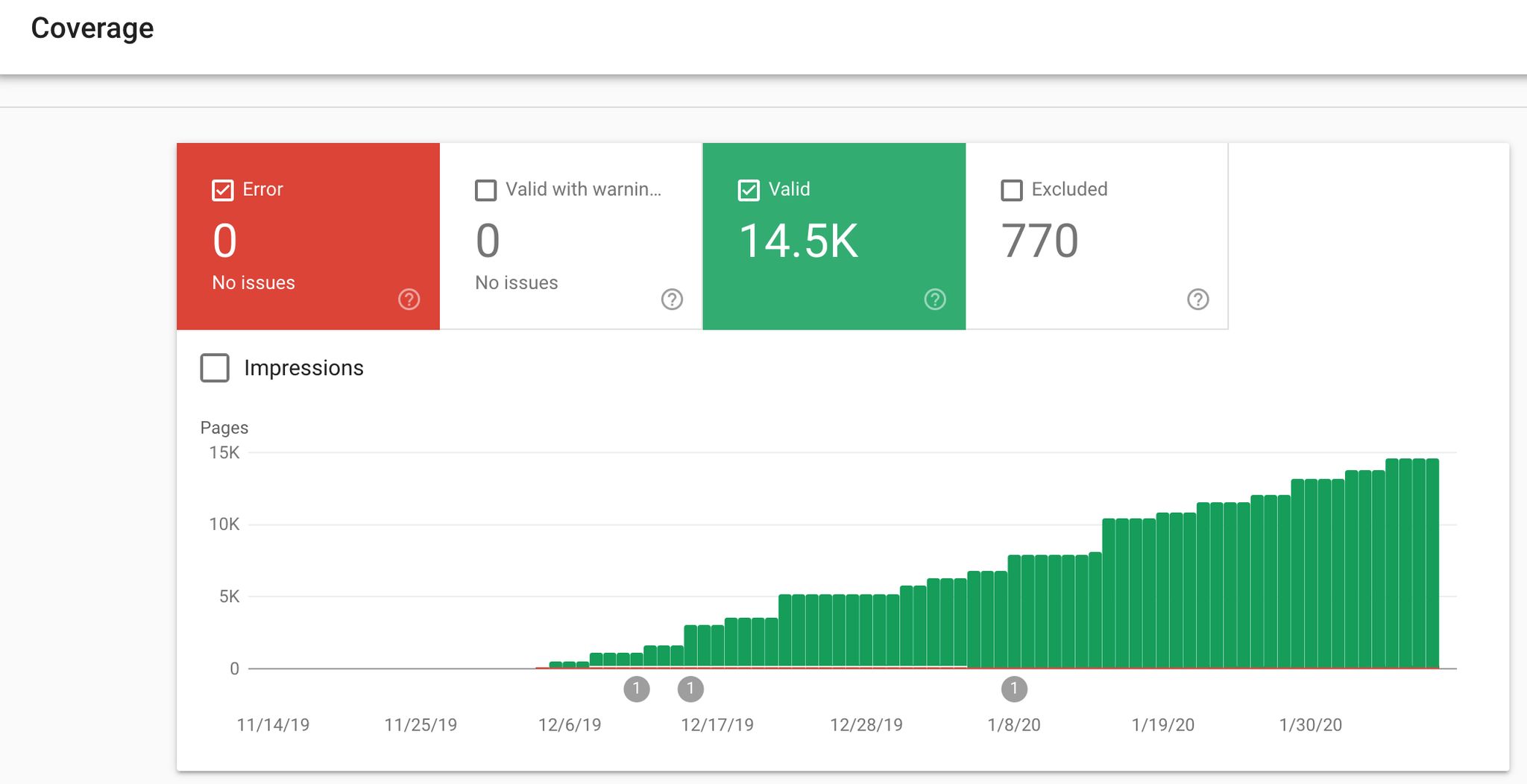
Read Coverage Reports
Google Search Console breaks down indexing issues into four categories:
| Status | Description | Action Needed |
|---|---|---|
| Error | Pages failing to index | Fix these immediately |
| Valid with warnings | Indexed but with issues | Review and address |
| Valid | Indexed successfully | Monitor regularly |
| Excluded | Intentionally not indexed | Verify if this is correct |
"The Index Coverage report gives you a fantastic overview and understanding of how Google views your website".
Keep an eye on trends and unexpected changes in your indexed pages. While Google crawls nearly 8.9 million pages daily, not all pages are guaranteed to be indexed.
"When it comes to indexing, we don’t guarantee that we will index all pages of the website. And especially for larger websites, it’s really normal that we don’t index everything. That can be the case that maybe we just index 1/10 of a website because it’s a really large website. We don’t really know if it’s worthwhile to index the rest."
Solve Common Index Errors
Here are some frequent indexing problems and how to address them:
- Noindex Tag Issues
For instance, Cleanvoice, an AI SaaS, saw a 300% increase in MRR in February 2025 after fixing "Excluded by noindex tag" errors. - Server Errors
These block Google from accessing your content. Ensure server response times are stable and reliable. - Duplicate Content
Use canonical tags to tell Google which pages should be indexed. This avoids index bloating that can dilute page authority and waste crawl budget.
Submit Pages for Indexing
Once you’ve fixed the issues, ask Google to re-crawl your updated pages. The URL Inspection tool is the quickest way to get Google’s attention for new or updated content.
Some quick facts: Google indexes 56% of URLs within one day, and 87% within two weeks.
SignHouse, an eSignature SaaS, achieved a 60x boost in organic traffic in six months by fixing "Excluded by noindex tag" issues and applying targeted SEO strategies.
"The ‘Excluded’ section of the Coverage report has quickly become a key data source when doing SEO audits to identify and prioritise pages with technical and content configuration issues".
For bulk updates, submit a sitemap with updated pages marked by <lastmod> tags.
Content and Technical SEO Fixes
Use Google Search Console (GSC) data to refine your website’s content and technical elements, boosting search performance.
Title and Meta Description Updates
Google often rewrites title tags and meta descriptions that don’t meet its standards. To avoid this, focus on creating tags that align with Google’s preferences.
| Element | Optimal Length | Best Practice |
|---|---|---|
| Title Tag | 60 characters | Place the primary keyword near the start |
| Meta Description | 150 characters | Clearly address user intent |
"Google’s generation of title links on the Google Search results page is completely automated and takes into account both the content of a page and references to it that appear on the web." – Manjit Lotey, Gold Product Expert
Use the Search Results report to identify trends, analyse click-through rate (CTR) changes, and adjust your tags based on Google’s guidelines. Regularly monitor these updates to see how they impact performance.
Internal Link Structure
Internal linking plays a key role in improving your site’s hierarchy and keyword relevance. The GSC Links report can help you refine your internal link strategy.
"Google likes to have a sense of what role a page plays in the bigger picture of the site." – Google SEO Starter Guide
Take inspiration from Backlinko, which significantly improved rankings by adding internal links from high-authority pages to new content. They used keyword-rich anchor text, helping their new posts land on the first page of search results.
GSC shows you the most linked pages on your website! Once your internal linking is optimised, focus on improving your site’s technical performance.
Core Web Vitals and Mobile Issues
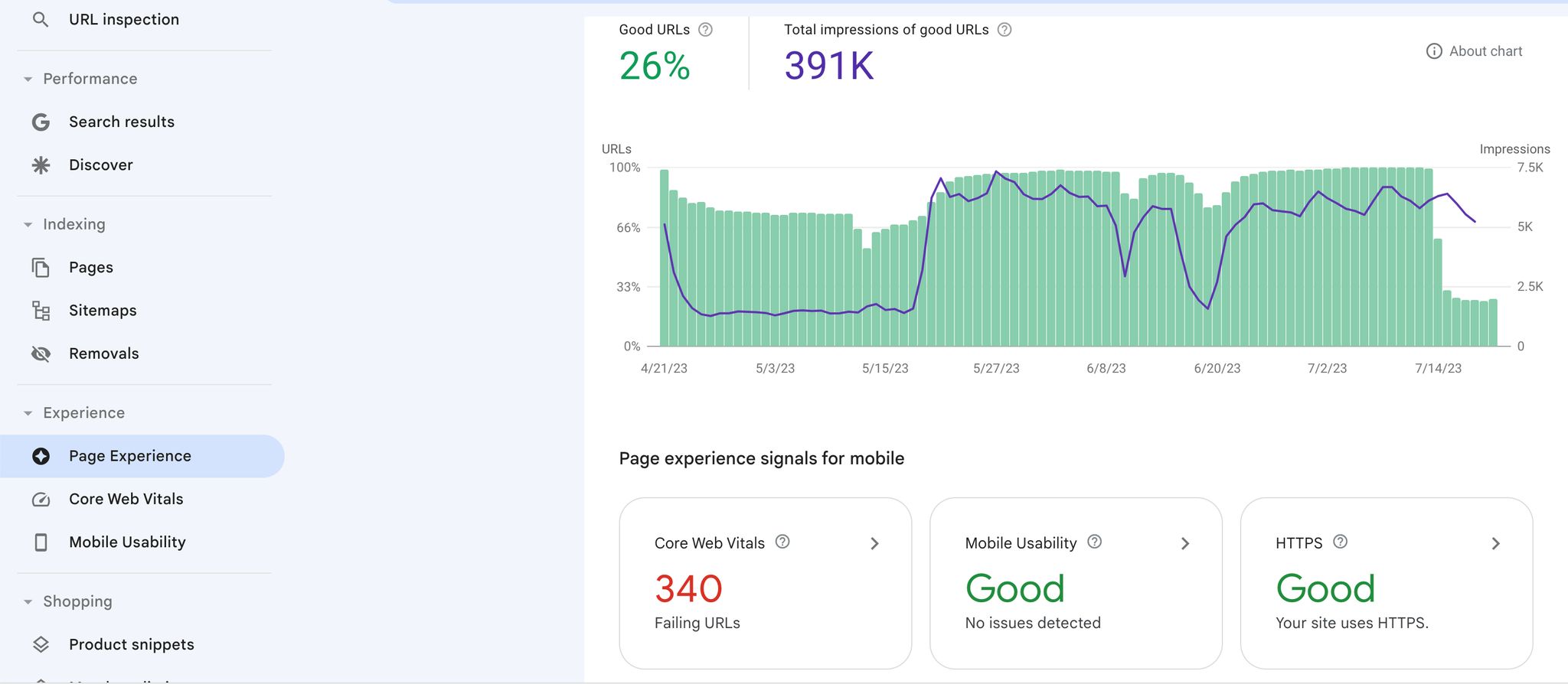
Core Web Vitals are important for user experience but not critical for your search rankings, and GSC offers detailed insights into these metrics.
| Metric | Good Score | Common Issues | Quick Fix |
|---|---|---|---|
| LCP | ≤ 2.5s | Large images | Compress images |
| INP | ≤ 200ms | Heavy scripts | Use code splitting |
| CLS | ≤ 0.1 | Dynamic content | Set fixed dimensions |
To improve these metrics:
- Identify Poor Performers
Use the Core Web Vitals report to locate URLs flagged as ‘Poor’ or ‘Needs Improvement.’ - Implement Technical Fixes
Optimise server response times, remove render-blocking requests, and compress images. Keep page resources under 50 items for better mobile performance. - Monitor Progress
Use the Mobile Usability report in GSC to track improvements. Ensure all pages meet Core Web Vitals thresholds on both mobile and desktop.
"In SEO, Google sometimes ignores title tags and meta descriptions for various reasons, such as length, readability, and symbols. Ensuring these elements are optimised is crucial for enhancing your website’s visibility in search results." – Sarah Berry, Lead SEO Consultant, WebFX
Next Steps
Audit Summary
Google Search Console (GSC) plays a key role in monitoring and improving your site’s SEO. After completing your audit or using our SEO audit service, create a schedule for ongoing maintenance. The timing will depend on your site’s type and competition level. Here’s a quick guide:
| Website Type | Recommended Audit Frequency | Key Focus Areas |
|---|---|---|
| Small Local Business | Every 6 months | Core Web Vitals, Local Rankings |
| E-commerce Sites | Monthly | Technical Issues, Product Indexing |
| Content Publishers | Quarterly | Performance Metrics, Content Health |
"GSC provides crucial data for monitoring and improving your site’s SEO performance." – Bob Cristello, Digital Architect, PKWARE
Regular Maintenance Tips
A consistent SEO maintenance routine ensures you stay ahead. Use this breakdown to plan your tasks:
| Timeframe | Tasks | Purpose |
|---|---|---|
| Weekly | Traffic Analytics, Rank Tracking | Keep an eye on performance trends |
| Monthly | Technical SEO Health Review | Quickly address technical issues |
| Quarterly | Sitemap & Indexation Check | Ensure search engines crawl your content correctly |
| Yearly | In-depth SEO Audit | Review overall site performance |
Pay special attention to keywords ranking between positions 5 and 15. These are your best opportunities to improve rankings quickly.
Professional SEO Help
Sometimes, routine maintenance isn’t enough. GSC offers powerful insights, but certain challenges require expert assistance. Consider reaching out to professionals if you encounter:
- Sudden traffic drops
- Core Web Vitals problems
- Manual penalties in GSC
- Complex data analysis using BigQuery exports
Tailor your audit frequency to your site’s size, competition level, SEO health, and how critical traffic is to your goals.
Related posts

Dorian Menard
https://staging.searchscope.com.auI’m Dorian, founder of Search Scope and an SEO obsessed with ROI and lead generation. After a decade in the trenches, I’ve built and ranked digital assets for businesses across the world. I cut through the noise with data, automation, and strategies that actually convert. When I’m not scaling rankings, you’ll find me on a motorbike or setting chess traps — always planning three moves ahead.