Why Your Google Business Profile Got Suspended and How You Can Fix It

Google is cracking down hard and suspending business profiles left and right. It’s ugly—businesses are vanishing from Maps overnight, losing traffic, leads, and reputation. If you want to avoid being the next casualty, you need to get a solid understanding on why Google pulls the plug in the first place.
Here’s a quick overview of the top reasons why profiles get suspended and how to avoid them:
- Incorrect Business Details: Inconsistent name, address, or phone number (NAP) information.
- Breaking Google’s Rules: Misleading names, banned content, or guideline violations.
- Fake Reviews: Posting or buying fake reviews triggers immediate action.
- Keyword Stuffing: Adding unnecessary keywords to your business name.
- Duplicate Listings: Multiple profiles for the same business location.
- Using Virtual Offices: Non-compliant addresses like P.O. boxes or unstaffed virtual offices.
- Sudden Major Changes: Drastic updates to your profile without proper verification.
- Prohibited Content: Offering restricted services or posting inappropriate content.
- Inactivity: Neglecting updates or customer interactions for extended periods.
- User or Competitor Reports: Complaints about inaccuracies or violations.
If your Google Business Profile is suspended, here’s how to resolve it quickly:
- Identify the Suspension Type:
- Soft Suspension: Profile is visible but can’t be managed.
- Hard Suspension: Profile is removed entirely (most common scenario).
- Understand the Cause:
- Common reasons include a wide range of policy violations (e.g., false info, keyword stuffing, prohibited content). The most common issues we see are the use of a storefront with a residential address, an incorrect use of service area locations, keyword stuffing in the business name and many other issues)
- Prepare Documentation:
- Gather proof of legitimacy, like business licenses, tax documents, utility bills, and videos or photos of your location. Ensure all details match your profile exactly.
- Submit an Appeal:
- Use the Google Business Profile appeals tool. Upload all evidence within 60 minutes.
- Wait for Review:
- Google typically responds in 5–7 business days, but it may take up to 2 weeks or even more in certain cases.
- Handle Rejections:
- If denied, review the rejection notice, fix issues, and submit an additional review of a denied appeal.
Pro Tip: Regularly update and audit your profile to prevent future suspensions but avoid changing key data in order not to trigger new suspensions.
For detailed steps, tips, and prevention strategies, read on.
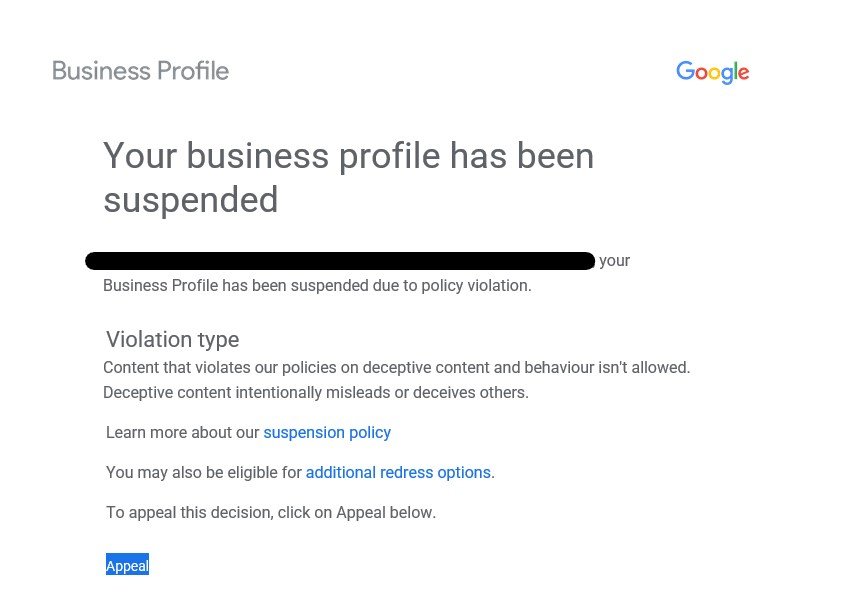
Why did Google Suspend My Business Profile?
There are many reasons why Google suspends Business Profiles and the assesment is always automated through their AI systems.
1. Incorrect or Inconsistent Business Details
Keeping your business’s Name, Address, and Phone number (NAP) consistent is key to avoiding problems like suspension.
Here’s why: 73% of users lose trust in a brand when they find incorrect business details, and 63% of customers steer clear of businesses with inconsistent NAP information.
| Information Type | Common Issues | Impact |
|---|---|---|
| Business Name | Variations or abbreviations | Immediate suspension risk |
| Address | Multiple locations or P.O. boxes | Hard suspension |
| Phone Number | Different numbers across platforms | Soft suspension |
| Operating Hours | Inaccurate or outdated times | Warning, then suspension |
For example, a landscaping company was suspended after changing from a storefront to a service-area business without completing proper verification.
"Google often suspends profiles for even minor mistakes." – Digital Division
To avoid these issues:
- Keep NAP details consistent across all platforms.
- Verify updates through Google immediately after making changes.
- Use accurate information, such as a physical location or proper service-area setup.
- Avoid minor errors, like abbreviating "Drive" to "Dr." in your address.
If your business operates from a private location, like your home, make sure to set up your profile as a service-area business. Trying to hide or alter your address can result in immediate suspension.
Even small mistakes or attempts to bypass these rules can lead to serious consequences for your profile. Always follow Google’s guidelines to keep your profile active.
2. Breaching Google’s Rules
Breaking Google’s rules doesn’t just risk getting your business profile suspended – it can also hurt your reputation and make it harder for customers to find you.
These rules are in place to ensure profiles are accurate and trustworthy. If you violate them, Google can suspend your profile without warning.
Some industries, like lawyers, locksmiths, and plumbers, face extra scrutiny because they’ve had higher rates of rule violations in the past. This often means longer suspension times.
"Google suspends listings for various reasons – especially if you are violating Google Business Profile Guidelines." – Search Engine Journal
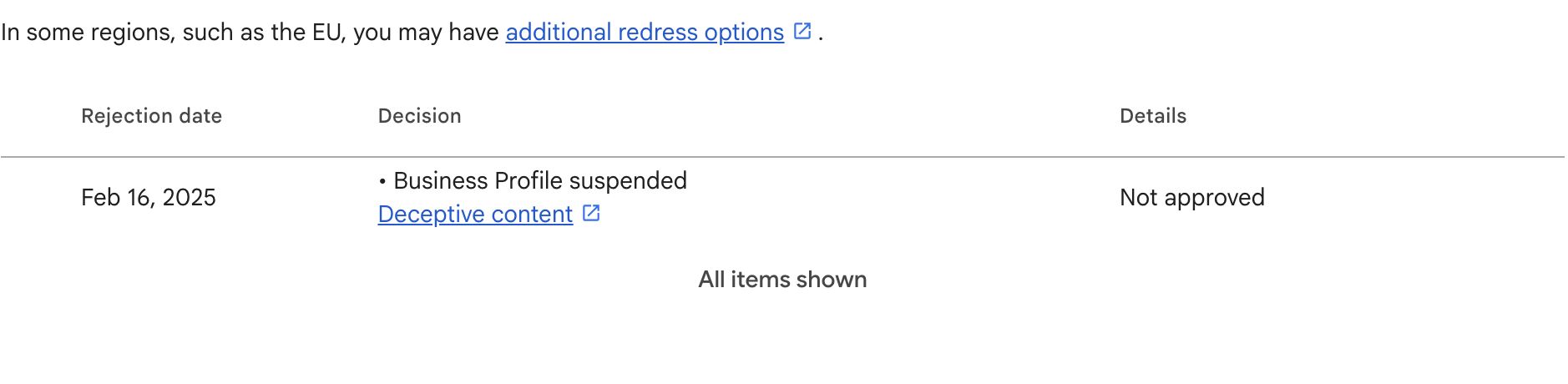 Here are some common reasons for suspension:
- Using misleading or inaccurate business names
- Posting banned content or misrepresenting your services
- Violating Google’s content policies
Google relies on both algorithms and user reports to catch violations. If suspicious activity is flagged, Google reviews the profile and may suspend it if rules are broken.
How to Stay Compliant
- Keep your profile updated and accurate.
- Act quickly if you receive a warning from Google. Save records of any changes you make.
- Regularly check your profile to ensure it meets Google’s policies.
If your profile does get suspended, you can appeal through Google’s reinstatement process. But be prepared – it can take weeks to resolve, and your visibility will take a hit during this time.
Even small tweaks to your profile can sometimes lead to suspension, so it’s important to stay cautious and follow the rules closely.

3. Fake or Bought Reviews
Posting fake or purchased reviews is a serious breach of Google’s guidelines and can lead to your profile being suspended immediately. To keep the platform trustworthy, Google actively monitors for fraudulent activity.
Here’s how Google detects fake reviews:
- Advanced algorithms that flag suspicious patterns and language
- IP address checks and monitoring posting frequency
- Machine learning to recognise unusual behaviors
- Manual reviews prompted by user reports
Common Red Flags:
- Sudden spikes in the number of reviews
- Reviews coming from questionable accounts or locations
- Coordinated posting behavior
- Feedback that doesn’t align with the business’s usual patterns
"Reviews are only valuable when they are honest and unbiased. We don’t allow fake reviews and take steps to prevent them." – Google Support
Best Practices for Managing Reviews:
- Offer great customer service and document key interactions
- Respond to all reviews – positive or negative – in a professional tone
- Regularly check reviews for authenticity
If your profile is suspended due to fake reviews, Google may delete all existing reviews, block new ones, and limit access to certain features. To reinstate your profile, you’ll need to go through a verification process and provide supporting documentation.
Staying compliant and focusing on genuine feedback not only avoids suspensions but also builds trust. Remember, other aspects of your profile, like your business name, also need careful attention to avoid issues.
4. Overusing Keywords in Business Name
Adding extra keywords to your Google Business Profile name might seem tempting, but it goes against Google’s guidelines and could get your profile suspended.
This tactic – known as keyword stuffing – often involves inserting irrelevant details like locations, services, or ranking phrases (e.g., "Best Emergency Plumber 24/7 Johnson’s") that don’t align with your actual business name. Not only does this risk suspension, but it also damages the credibility of your profile, which is crucial for success.
Here’s how Google typically responds to keyword stuffing:
- 60% of cases receive initial warnings
- 20% result in soft suspensions (reduced visibility)
- 20% lead to hard suspensions (complete removal from Google Maps)
"Including unnecessary information in your business name is not permitted, and could result in your Business Profile being suspended." – Google My Business Guidelines
Google identifies keyword stuffing using a mix of algorithms, manual reviews, and reports from users like Local Guides. Frequent offenders often face escalating consequences, starting with warnings and moving to suspensions.
Interestingly, a Moz report from 2018 found that keywords in business names were the top factor for Local Pack rankings. However, trying to exploit this through keyword stuffing usually backfires, as the penalties far outweigh any short-term ranking boosts.
While the SEO benefits are undeniable, this tactic must be executed correctly. The best approach is to legally register your business name (or "trading as" name) with your target keywords, ensuring compliance while maximising visibility.
And while keyword stuffing is risky, duplicating listings can be just as harmful.
5. Duplicate Business Listings
Having more than one Google Business Profile for the same location goes against Google’s rules and often leads to suspensions.
Some businesses might think creating separate listings for different services is helpful, but this usually backfires. Both soft and hard suspensions can occur, which can seriously hurt your online presence.
Joy Hawkins, Owner of Sterling Sky, explains:
"Duplicate listings usually filter each other due to the Possum update so having multiple listings means that they are competing for the same spot"
Duplicate listings create several problems:
- Reviews get split, which can weaken the trustworthiness of your profile.
- Google’s system filters duplicate profiles, reducing your overall visibility.
- Inconsistent details across listings can confuse potential customers.
- Google may penalise businesses by limiting visibility or suspending accounts entirely.
Google’s algorithms identify duplicates by comparing details like business names, addresses, phone numbers, and website links. If duplicates are flagged, you need to act quickly to avoid suspension.
How to Fix Duplicate Listings
- Claim all listings and contact Google Business Profile support to merge them.
- Ensure the remaining profile is accurate and up-to-date with your latest business information.
To stay on Google’s good side, stick to one well-maintained profile for each location. This approach avoids penalties and ensures better results in local searches.
And remember: using virtual offices or P.O. boxes instead of real locations can lead to even harsher penalties.
We offer a professional citation cleaning service as part of our local search engine optimisation services.

6. Using Virtual Offices or P.O. Boxes
Google requires businesses to have a physical location that customers can visit during business hours, making virtual offices and P.O. boxes non-compliant with their guidelines.
"After discussing with the policy team, we do not want pure Service Area Businesses to use virtual offices. Per the Google My Business guidelines, virtual offices are not allowed unless staffed during the business hours."
This rule is in place to ensure profiles are accurate and trustworthy. Google has tightened its verification process, often requiring proof of a legitimate business location.
| Location Type | Requirement |
|---|---|
| Virtual Office | Must have staff present during business hours |
| P.O. Box | Not allowed under any circumstances |
In 2025, Google does not want businesses to operate from a residential address and act as a storefront! If you run your business from a home address and only use it for administrative purpose, this could get you in trouble.
You will need to hide your address from the public and register as a service area business. You can pick up to 20 locations you service in the Google Business Profile settings.
How to Stay Compliant
To avoid issues:
- Use a home address, rent actual office space, or set up a service-area business without displaying an address.
- Ensure your physical location has clear signage and on-site staff.
- If you only use your residential address for administrative tasks, this is not good enough for Google and you will need to hide your address and register as a service area business.
- Keep the location accessible during the hours you list.
"Google basically wants to prevent businesses from renting dozens of offices in various cities just to establish an online presence in those areas."
If your profile gets suspended for address violations, you’ll need to provide a compliant address before appealing. This strict verification process helps maintain the reliability of Google Business Profiles, ensuring users get accurate information.
Also, keep in mind that sudden changes to your profile – beyond just address issues – can lead to suspensions.

7. Sudden Major Profile Changes
Making changes to your Google Business Profile requires careful planning to avoid triggering Google’s automated systems. Abrupt or drastic updates can lead to automatic suspensions, as Google’s algorithms may interpret these as signs of spam or manipulation.
High-Risk Changes and How to Handle Them
Certain profile updates are more likely to prompt reviews or even suspensions:
| Profile Element | Risk Level |
|---|---|
| Business Name | Very High |
| Primary Category | High |
| Address/Location | High |
| Phone Number | Medium |
| Business Hours | Low |
To minimise risks when updating your profile:
- Spread out changes instead of making multiple updates at once.
- Document major updates to provide evidence if a review is needed.
- Ensure consistency across all online platforms and directories.
- Double-check information for accuracy before submitting.
"I think anytime you change name, address or phone, it triggers some type of moderation or review or at the very least puts up a red flag." – Colan from Local Search Forum
We highly advise monitoring your profile for any updates suggested by external users!
Handling Profile Updates Carefully
Frequent or poorly planned updates can raise suspicion and lead to suspension. If changes are necessary, make sure they are accurate and backed by a valid business reason. Keep in mind, edits will appear as "pending" while Google reviews them.
Even if you’re cautious, factors like user reports or competitor actions can still put your profile at risk – something we’ll delve into next.
8. Prohibited Content or Services
Google has strict rules for content and services on Business Profiles to ensure the platform remains safe and trustworthy. Breaking these rules can lead to immediate suspension.
Common Prohibited Categories
| Content/Service Type | Examples | Risk Level |
|---|---|---|
| Illegal Activities | Unauthorised substances, counterfeit goods | Immediate |
| Adult Content | Explicit material, adult services | High |
| Dangerous Products | Weapons, explosives | Immediate |
| Hate Speech | Discriminatory content | High |
| Misleading Information | False claims, deceptive practices | High |
How Google Monitors Compliance
Google uses a mix of automated tools, manual reviews, and user reports to identify violations. Businesses need to keep a close eye on their content to avoid penalties, focusing on areas like:
- Private or sensitive information
- Illegal or harmful content
- Sexually explicit material
- Products or services restricted by law
"Content that has been incentivized by a business in exchange for discounts, free goods and/or services" is prohibited. – Google Review Policy
High-Risk Industries
Certain industries, like gambling, firearms, and adult entertainment, are under tighter scrutiny. These businesses must follow both local laws and Google’s policies to stay compliant.
Tips to Stay Compliant
Follow these steps to reduce the risk of violations:
- Regularly review and update your content.
- Remove anything questionable as soon as possible.
- Ensure your services meet legal and platform standards.
- Keep an eye on user-generated content.
- Quickly address any flagged issues.
Failing to follow these guidelines can lead to suspension, harm your reputation, and erode customer trust. Even if your content follows the rules, staying active and responsive is key to maintaining your Business Profile.
9. Inactive or Unresponsive Business
Google takes its business listings seriously, and businesses that remain inactive or fail to respond to customers risk having their profiles suspended. This policy became stricter starting December 2023, as Google rolled out tighter account management rules.
What Can Lead to an Inactivity Suspension?
Google may suspend a profile if it shows signs of neglect. Some common red flags include:
- Going more than two years without updates
- Ignoring customer reviews or inquiries for over three months
- Having outdated or inconsistent business details
- Failing to verify the profile when requested
What Happens When a Profile Is Suspended?
If your profile gets suspended, it essentially vanishes from Google Maps and Search. This means potential customers won’t be able to find or interact with your business online.
How to Keep Your Profile Active
To avoid suspension, make it a habit to keep your profile updated and engage with customers. Here are some tips:
- Regularly check and update business hours and contact details
- Respond quickly to customer reviews and questions
- Ensure your services or offerings are up to date
- Complete any verification requests from Google
A good rule of thumb is to update your profile at least every two months. According to internal Google data, businesses that stay active and responsive are far less likely to face suspension. Plus, regular updates help boost your online presence.
That said, even active profiles can face risks if users report issues, so staying on top of your profile is always a smart move.
10. Reports from Users or Competitors
Reports from users or competitors play a major role in Google’s moderation system. These reports often result in profile suspensions after a detailed review process.
Common Report Types That Can Lead to Suspensions
Here are some of the most common violations that trigger reports and potential suspensions:
- Inaccurate information: Complaints about incorrect details, like wrong addresses or business hours, can lead to action if not resolved.
- Fake reviews: Reports of review manipulation, such as fake positive or negative reviews, often prompt investigations by Google.
- Prohibited content: Violations of Google’s content policies, such as advertising restricted services.
- Duplicate listings: Having multiple profiles for the same business location.
How Google Processes Reports
When a report is submitted, Google conducts a thorough review. During this time, profiles may be suspended while the investigation is underway. This process can take several weeks, and in some cases, Google may contact your customers to verify the claims.
"Google wants to ensure users have access to consistent high-quality search results. Ultimately, this benefits everyone involved in the sales process – cleaner search results lead to more streamlined user experiences, which make customer interactions and generating sales leads much more likely."
Steps to Protect Your Business Profile
To reduce the chance of user or competitor reports leading to suspension, follow these steps:
- Keep your profile updated: Regularly check for unauthorised changes or incorrect information.
- Respond to customer concerns quickly: Addressing issues early can prevent them from escalating into formal reports.
- Maintain detailed records: Document your business operations and customer interactions.
- Follow Google’s policies: Stay informed about the latest guidelines and ensure compliance.
Inactive profiles are more vulnerable to reports, increasing the likelihood of suspension. If your profile is suspended, reach out to Google support immediately and provide detailed evidence to support your appeal.
Handling False Reports
Google has systems in place to detect and prevent misuse of the reporting feature. By maintaining a compliant profile and keeping thorough records, you’ll be better equipped to dispute false claims effectively.
Types of Suspensions: Soft vs. Hard
Google issues two types of suspensions: soft suspensions, which limit your ability to manage the profile but keep it visible, and hard suspensions, which remove the profile entirely from Google (the most common ones).
Each type requires a different approach to resolve.
Soft Suspensions:
- The profile stays visible to users.
- You lose the ability to manage or edit profile details.
- Typically caused by minor rule violations.
- Often fixed with a straightforward verification process.
Hard Suspensions:
- The profile is completely removed from Google Search and Maps.
- You lose all visibility and management access.
- Usually caused by major violations or repeated issues.
- Requires a detailed appeal to address.
The first step in resolving a suspension is understanding what caused it. In order to do that, you will need to go through Google detailed documentation on how to represent your business on their platform. You can use an LLM to load up all their relatively boring documents and save time!
Once you know the issue, you can gather the necessary details to address it properly.
Preparing to Resolve a Suspension
After figuring out why your account was suspended, the next step is getting ready to fix the issue.
Review Google’s Guidelines
Start by carefully reviewing the Google Business Profile guidelines.
Make sure your address meets Google’s requirements, double-check that all business details match your official documents, and confirm that everything on your profile follows Google’s policies.
Once you’re confident your profile complies with the rules, it’s time to gather the evidence you’ll need for your appeal.
Google provides pages of guidelines for GBP, but identifying the exact reason for a suspension isn’t always straightforward. For those using ChatGPT, we recommend uploading the full documentation into a custom GPT to create a dedicated assistant—but even then, you need to know where to look to spot the potential issue.
Collect Required Evidence
You’ll need clear and specific documentation to prove your business is legitimate. Keep in mind, you only have 60 minutes to submit your evidence once you begin the appeal process, so being well-prepared is crucial.
Collect documents that verify your business identity (e.g., business registration, licenses, tax certificates), location (e.g., utility bills, lease agreements), operations (e.g., receipts, invoices, photos of signage), and ownership (e.g., government-issued ID, ASIC registration documents).
Make sure these documents meet the following criteria:
- Up-to-date: For example, utility bills should be dated within the last 90 days.
- Easy to read: All text and details must be clearly legible.
- Consistent: Your business name and address must match exactly what’s listed in your Google Business Profile.
If your business operates out of a co-working space, you’ll also need to provide proof of a dedicated office area, permanent signage, customer access, and on-site staff.
How to Submit an Appeal to Google
Use the Google Business Profile Appeals Tool
Once you’ve gathered all your documentation, submit your appeal through Google’s official channel.
Log in to the Google Account associated with your Business Profile and access the Google Business Profile appeals tool. If you manage multiple locations, make sure to select the correct suspended listing.
Here’s how to navigate the appeal process:
- Review the suspension details and confirm you understand the violation policy.
- Click "Submit Appeal" to begin.
- Upload all necessary evidence within 60 minutes of starting the appeal.
For businesses with more than 10 suspended profiles, create a spreadsheet listing the evidence and Business Profile IDs for each location.
Tips for Submitting Evidence
When providing evidence, focus on ensuring it is clear and directly relevant to the issue. Here’s what you should include:
| Document Type | Purpose |
|---|---|
| Business Registration | Proof of legitimate operation for the current year. |
| Utility Bills | Recent bills (dated within 90 days) to confirm the location. |
| Photo Evidence | High-quality images showing the physical presence of your business. |
| Government ID | Valid identification confirming ownership. |
Best Practices:
- Submit evidence that directly addresses the reason for suspension.
- Ensure all submitted details match your Business Profile information exactly.
- Combine all evidence into a single, well-organised appeal.
"First-time requests typically take 5-7 business days for review, though Google officially states it may take up to 2 weeks for a response".
If your first appeal is denied, you can request another review using the designated form called “Request additional review of a denied appeal”.
These follow-up reviews usually receive a response within 24-72 hours. Avoid submitting multiple appeals at the same time, as this can slow down the process and cause unnecessary complications.
A well-prepared appeal increases your chances of reinstating your profile and getting your online presence back on track. Once submitted, it’s essential to understand the review process and prepare for any next steps.
Our team recently reinstated a client’s profile in less than 1 day using this form!
sbb-itb-c74901f
After Submitting the Appeal
Review and Response Timeline
Once you’ve submitted your appeal using the Google Business Profile appeals tool, the review process begins.
Typically, Google takes about 5-7 business days to review your case. However, depending on the workload of Google Business Profile Support, it may take up to 2 weeks or even more when Google is under a lot of requests.
You can track the progress of your appeal through the Google Business Profile appeals tool. This tool allows you to:
- Check the current status of your appeal.
- See details about the specific policy violation.
- Receive notifications if Google requires more information from you.
If your appeal doesn’t succeed, it’s essential to know how to move forward.
Dealing with Rejected Appeals
If your appeal is denied, here’s how you can address the issue:
| Step | Action to Take |
|---|---|
| Review | Carefully read the rejection notice for details. |
| Analyse | Compare your profile with Google’s guidelines and with your competitors. |
| Gather | Collect additional evidence to address the issues. |
| Submit | File a follow-up appeal with stronger documentation. |
Key Tips:
- Identify any missing evidence or gaps in your original submission.
- Ensure all details in your appeal match your Business Profile exactly.
- Focus on providing documentation that directly addresses the rejection reasons.
Some common reasons for rejected appeals include:
- Business information that is incomplete or incorrect.
- Not enough evidence to support your appeal.
- Failing to fully resolve the original policy violation.
When preparing a follow-up appeal, make sure to address any gaps highlighted in the rejection notice. Each new submission should include stronger, more detailed evidence than the last.
If you’re dealing with complicated suspension issues or have faced multiple rejections, it might be worth consulting professionals who specialise in Google Business Profile management.
They can offer expert advice on meeting compliance requirements and navigating the appeals process.
Preventing Future Suspensions
Fixing a suspension is one thing, but taking steps to prevent it from happening again is just as important. Regularly reviewing your profile can help catch and correct issues early, keeping your online presence stable and your business reputation intact.
Keep Information Accurate and Updated
Make sure your profile details are always correct. This includes things like business hours, contact info, service areas, and categories. Regularly check and update this information, document any changes, and keep verification records handy to stay on top of compliance.
Focus on these key areas:
- Consistent business information across all platforms
- Accurate and complete profile details
- Clearly defined service area boundaries
- Correct business categories and attributes
- Recent, genuine photos and other media

Avoid Common Errors
Certain mistakes are known to trigger suspensions. Steering clear of these can save you a lot of trouble:
Duplicate Profiles: Having multiple profiles or overlapping service areas can lead to automatic suspensions.
False Information: Be truthful and consistent in your business details, including categories, service areas, and claims about your products or services.
Ignoring Policies: Stay updated with Google’s guidelines and regularly review your profile to ensure compliance. This proactive approach can help you avoid policy violations.
Making too many edits at once: Avoid login in once a year to update every single field. This is your ticket to a straight suspension!
"The key to preventing suspensions is maintaining consistent information across all platforms while strictly adhering to Google’s guidelines. Regular audits and immediate corrections of any discrepancies are essential for long-term profile stability."
We now recommend all our clients to only perform edits of core elements (Name, Categories, Phone, URL, Address) from the front end, through Google Maps suggest and edit feature.
Restoring and Protecting Your Google Business Profile
Getting your Google Business Profile reinstated after a suspension requires a careful and organised approach.
The key steps involve pinpointing the violation, gathering all necessary documentation, and submitting a well-prepared appeal. While the review process usually takes 5–7 business days, delays can happen, so patience is important. Submitting a single, well-thought-out appeal can help avoid unnecessary delays.
Before you hit submit, make sure to review Google’s guidelines thoroughly. Collect any required documents, such as business licenses or utility bills, and craft clear explanations that directly address the violation. Keep in mind, you only have 60 minutes to complete the submission process, so being well-prepared is critical.
"Compliance is essential to protect the profile from suspensions and to maintain trust with Google and potential customers. Non-compliance can lead to suspensions, which can negatively impact a business’s online visibility and reputation."
If your appeal is denied, don’t give up. Take the time to reassess your profile, ensure it aligns fully with Google’s guidelines, and gather additional evidence. Use the "Request additional review of a denied appeal" form to present a stronger case with better documentation.
Once your profile is reinstated, keeping it in good standing is just as important. Regular audits and a compliance monitoring system can help you avoid future issues.
Setting up a quarterly review schedule is a simple way to ensure your profile stays compliant and up-to-date. For more complex suspension cases, seeking professional help can provide the expertise needed to navigate the appeals process and maintain long-term compliance.
Partnering with Experts for Google Business Profile Management
Handling a Google Business Profile, especially after a suspension, can be tricky. Agencies like Search Scope, known for their expertise in local SEO and Google Maps, assist businesses in avoiding and resolving suspensions.
Our business profile reinstatement services include compliance audits, appeal preparation, and ongoing profile management.
Here’s a quick look at how professional management can help:
| Aspect | Benefits of Professional Management |
|---|---|
| Prevention | Regular compliance checks, profile optimisation, and updates to reduce suspension risks. |
| Resolution | Skilled appeal handling, evidence gathering, and violation analysis. |
| Maintenance | Continuous updates, review management, and adherence to Google policies. |
One major benefit of working with experienced SEO professionals is their in-depth knowledge of Google’s ever-changing rules. They ensure your profile stays compliant while improving its visibility.
When choosing an agency for managing your Google Business Profile, prioritise those offering:
- Thorough audits to spot potential issues before they escalate.
- Specialised skills in Local SEO and Google Maps optimisation.
- Proven success in resolving profile suspensions and managing appeals.
- Ongoing monitoring to keep your profile in line with Google’s standards.
- Organised documentation for swift responses to verification requests.
For businesses in Western Australia, local experts bring added value by understanding regional market dynamics while meeting global requirements. Their proactive methods can save time and prevent future disruptions.
Professional management isn’t just about fixing problems – it’s about stopping them before they start. By using structured strategies, agencies can help keep your profile running smoothly and your business moving forward.
Even if you decide to work with experts, knowing the steps to handle suspensions yourself can be a game-changer when needed.
Managing Your Google Business Profile
Handling a Google Business Profile requires attention to detail and strict compliance with Google’s rules. By staying on top of key areas, businesses can protect their profiles and maintain a strong online presence.
Here are a few areas to prioritise for a healthy profile:
- Accurate Information: Ensure your business details are consistent across all platforms. Even small discrepancies can lead to suspensions if flagged.
- Customer Reviews: Focus on gathering genuine feedback from real customers to build trust.
- Compliant Details: Keep your profile information in line with your official business registration.
If your profile gets suspended, take action quickly:
- Review the suspension notice carefully to understand the issue.
- Correct any violations listed in the notification.
- Collect documents that support your case.
- Submit a detailed reinstatement request to Google.
Although reinstatement is possible, it’s always better to prevent issues in the first place. Regularly checking your profile and following Google’s guidelines helps ensure your profile stays active and visible.
Need help? At Search Scope, your Australian SEO agency, we specialise in Google Maps SEO, compliance, and reputation management. We can assist in keeping your profile in top shape so you can continue attracting customers.
FAQs
Why did Google suspend my business profile?
Google suspends profiles when they detect guideline breaches, such as:
- Incorrect Business Information: If your business name, address, or contact details don’t align across platforms or official documents, it can flag Google’s verification systems.
- Violation of Guidelines: Practices like keyword stuffing in business names or using virtual office addresses often lead to suspension.
"A Google Business Profile suspension often occurs when using a business name that doesn’t match your actual business or providing incorrect contact details".
Suspensions can be either soft or hard (as explained earlier). To get your profile reinstated, you’ll need to provide clear documentation. This might include a business license, tax ID, utility bills, or photos showing your location and signage.
Google typically doesn’t explain the reason for suspension upfront. You’ll need to reach out to them directly to identify the issue and resolve it.
FAQs
Steps to Unsuspend Your Google Business Profile
If your Google Business Profile has been suspended, here’s how you can work on restoring it:
- Log in to your Google account linked to the profile.
- Access the Google Business Profile appeals tool and choose the suspended profile.
- Review the violation details provided.
- Submit your appeal within the 60-minute session, including all required evidence.
For examples of acceptable documentation, check out the ‘Submitting an Appeal’ section mentioned earlier.
Google typically takes 5-7 business days to review appeals, but in some cases, it might take up to 2 weeks. If your appeal is denied, don’t panic – here’s what you can do next:
- Revisit Google’s guidelines to ensure you fully understand the issue.
- Fix any unresolved problems.
- Collect additional supporting documents.
- Use the "Request additional review of a denied appeal" form to submit your updated appeal.
The key to a successful appeal lies in providing evidence that directly addresses the policy violation. If your case is particularly complicated, or if you’re unsure how to proceed, you might want to get help from professionals who specialise in managing Google Business Profiles.
Related posts

Dorian Menard
https://staging.searchscope.com.auI’m Dorian, founder of Search Scope and an SEO obsessed with ROI and lead generation. After a decade in the trenches, I’ve built and ranked digital assets for businesses across the world. I cut through the noise with data, automation, and strategies that actually convert. When I’m not scaling rankings, you’ll find me on a motorbike or setting chess traps — always planning three moves ahead.